
Prepare my site brief: worksheet and printable PDF
01
Start with one door and three journeys.
Describe an employee arriving, a visitor being welcomed and an occupant leaving. For each journey, identify the entrance, decision owner and expected outcome. Repeat for deliveries or occasional contractors where relevant; they should not automatically inherit permanent permissions.
Assign each door an identifier and retain it on plans, equipment lists and test records. A label such as ‘back door’ becomes ambiguous as a building grows. State who creates, changes and removes permissions, and who retains configuration after handover: daily administration is part of the requirement.
ACCESS EXPERIENCE · FICTIONAL ENTRANCE A01
Credential accepted. Door open?
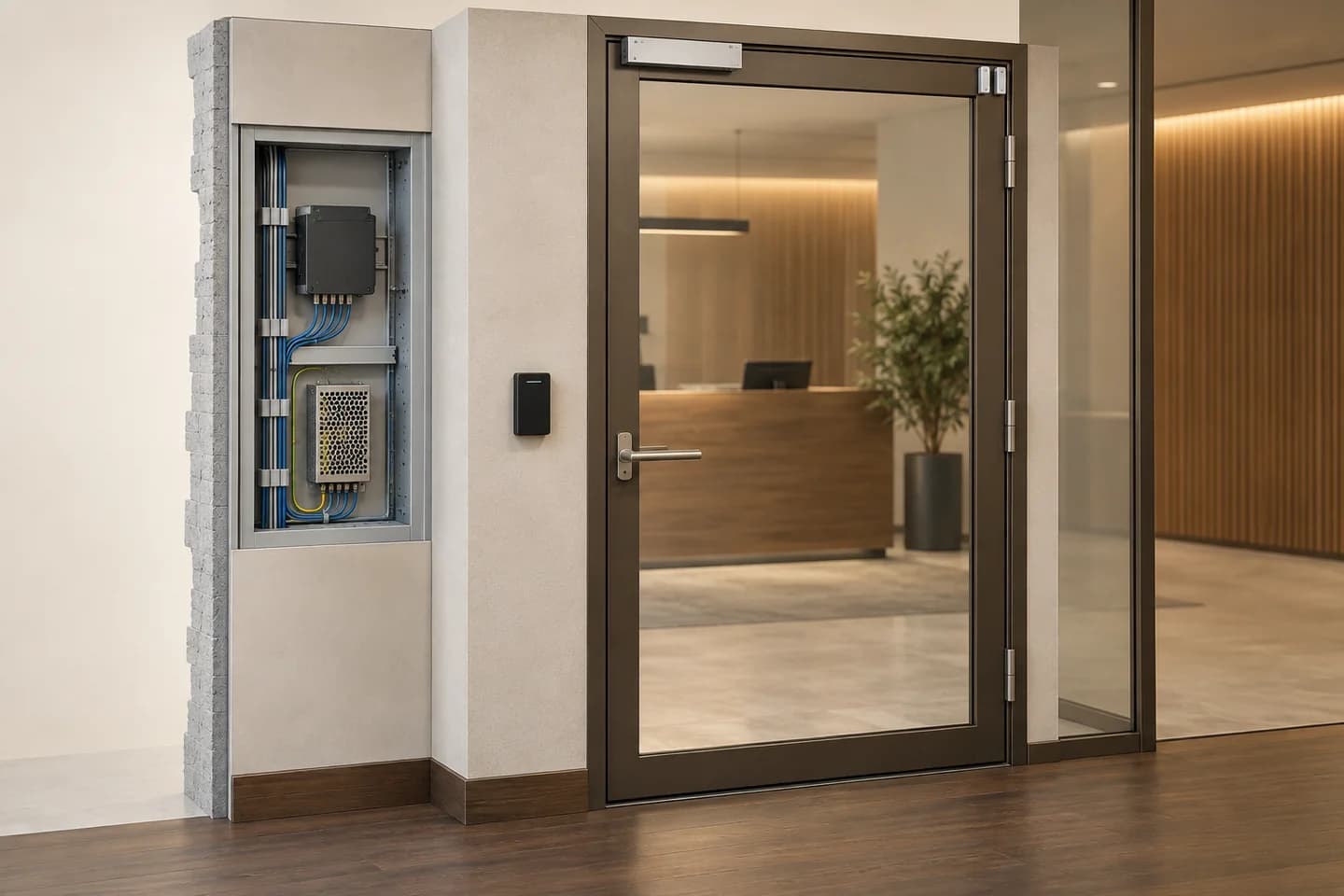
Present a credential, then open the door in the diagram. The controller decides; the door contact reports whether the door actually moved.
The reader transmits an identifier. It proves neither permission nor entry.
Last credential read : No credential presented
- Decision
- Waiting for a credential
- Simulated release
- No active command
- Contact feedback
- Door closed
2 · Act and observe · principle diagram
Simulated position: closed
Present an authorised credential with an applied command before trying to open the door.
A closed door is not proof of secure locking.
Decision : Waiting for a credential. Simulated release : No active command. Contact feedback : Door closed.
This demonstration’s event log
Present a credential to start. No real event is recorded.
What your equipment brief should cover
Document the reader, permissions, controller, locking device, power supply and door contact. Specify the interfaces and feedback actually available; one device may combine several functions. Adjacent catalogue references are starting points, not a validated kit.
Educational principle, not a wiring or escape design. Power-loss behaviour, exit devices and safety requirements must be assessed separately by competent professionals. Intrusion-alarm state remains independent.
Reader, relay and contact roles · Axis documentationAI-generated concept · generic equipment. Static equipment view and interactive diagram, not a 3D model or completed installation. No real credential, device or log is used.
02
Identify, decide, command, observe.
Controller documentation distinguishes the reader, lock command and door-monitor input. These roles differ: sending a command does not prove the door moved.
01 · Access request
Credential or visitor call: specify the intended method and users. Do not select a credential format without checking readers and management software.
02 · Decision
Define who may enter, where and when, then who manages those permissions. For visitors, identify the receiving station and authorised responder.
03 · Entrance action
Have the door, lock, power and control-interface combination checked. Request defined fault behaviour; this page provides no wiring diagram.
04 · State feedback
Distinguish a denied request, authorised command and observed state. If closure confirmation is required, identify the device and function providing that information.
03
Decisions that materially change the installation.
For IP intercoms, SIP can connect endpoints directly or through a server. That alone validates neither video, door commands nor your references’ compatibility: specify the function to test.
Scroll the table horizontally to compare all three columns.
| Decision | Use to define | What to check |
|---|---|---|
| Single door or multiple entrances | Entrance count and shared or separate permissions. | Administration, extensions, configuration backup and expected behaviour if a link is unavailable. |
| Local reception or forwarded calls | Where can someone answer during the relevant hours? | Endpoints, network, any server, permissions, licences and outcome when nobody answers. |
| Permanent or temporary access | Employee, visitor or contractor: which scope and period? | Actual functions for granting and removing permission, with an identified owner. |
| Existing system or replacement | Which readers, credentials, cables and doors will be retained? | References, versions, mechanical condition and whole-system validation. Matching connectors are insufficient. |
04
Example: a visitor at an office reception.
ILLUSTRATIVE EXAMPLE
Fictional scenario with a public lobby and a staff-only area. It defines selection and test criteria, not a ready-to-install configuration.
Identified call
The visitor calls from the named entrance. The team asks to check which station rings, which label appears and what happens without an answer. Video remains a function to confirm.
Limited authorisation
An authorised person accepts the relevant entrance, not every site door. Testing checks the correct command and specified feedback, then absence of implied access to the staff area.
Denial and visit end
A second test covers denial without an opening command. If temporary permission was requested, also verify its end according to the chosen system, recording results with non-personal test identifiers.
Exit and safety requirements are handled separately by competent people. No commercial scenario should impose unvalidated locking.
05
One record per door. One owner per function.
Door and environment
Identifier, use, mounting surface, exposure and mechanical constraints. Survey relevant characteristics on site; a photo does not validate installation.
Permission matrix
User groups, affected doors, required schedules and permission administrator. Use fictional profiles in the enquiry rather than named personal records.
Network and power
Links, available infrastructure and IT contact. Specify every powered load; PoE support on a device does not prove it will power the whole doorway.
Events to verify
Granted and denied access, unanswered visitor calls, revoked credentials and requested feedback. Add fault situations for assessment without assuming undocumented offline operation.
Handover and management
Final references, validated diagrams, tests, backup and administrator-access handover through an appropriate channel. Never submit opening codes or passwords in a public form.
06
Safe exit is not a comfort option.
Lock behaviour during electrical faults or safety situations cannot be chosen for convenience alone. Determine applicable requirements and validate mechanics, control and interfaces together. This page prescribes no lock type, wiring or emergency-release procedure.
Also define who reviews logs and why, the information actually needed and retention rules to validate. Do not enable biometrics, visitor recording or remote access by default in the brief. Technical availability does not establish that use is authorised or suitable.
07
Before selecting references.
Will an existing credential work with a new reader?
Identify technology, format and management system, then confirm the exact combination. ‘RFID’ or credential shape proves neither interoperability nor security level.
What should happen when a credential is lost?
Name an owner, request the prescribed revocation procedure and test it with a test credential. Specify how a replacement is assigned and recorded without sharing permanent access between users.
Should the intercom work without Internet?
State it as a requirement to verify: local calls, remote forwarding and opening may have different dependencies. Request the retained-function list and a controlled test instead of inferring behaviour from ‘IP’ alone.
Does opening also disarm the alarm?
Not by default. Both systems and permissions remain separate. If coordination is needed, specify the authorised event, intended response and fault conditions, then validate the interface.
How do I reach my project after login?
‘Open my projects’ goes through login to the project workspace in your language. Professional access and assigned prices require account approval; selection prepares a quotation, not an online purchase.
Technical sources
External reading references. These documents explain principles; they do not certify catalogue products or their combination.
- AXIS A1210 Network Door Controller — User manualAxis Communications · Sources consulted on
- SIP — An introductionAxis Communications · Sources consulted on